Updating your Universal Credit Journal
From April 2026, you need to update your Universal Credit journal. This page shows you, step by step, how to confirm your rent and service charges.
Sign in to your Universal Credit account
From 6 April 2026, you will see a new ‘To Do’ in your Universal Credit (UC) journal. This To Do is called ‘Confirm your housing costs’. It’s important that you complete it so your Universal Credit is worked out correctly.
What you need to do
Universal Credit will ask you to check and update:
- Your rent amount
- Any eligible service charges
- Any other housing‑related charges
You will be asked to confirm:
- How often you pay
- How much you now pay
The rent letter we sent you in March will have details of your new rent and service charges.
What happens when you complete the To Do
Completing the ‘Confirm your housing costs’ task helps to:
- Make sure your Universal Credit payment is correct
- Prevent delays or problems with your housing costs being paid
What each screen looks like
You can use the screenshots in this guide to help you while you complete the To Do.
Step 1: Confirm the date your housing costs changed
The first question you see depends on how often you pay your housing costs.
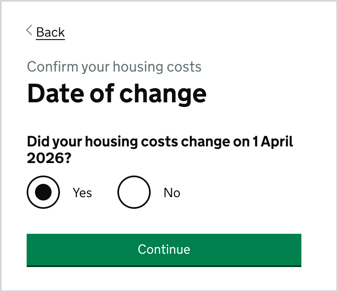
If you pay monthly, you will be asked:
“Did your housing costs change on 1 April 2026?”
On this screen you will see:
- A heading: Date of change
- Two options: Yes or No
- A Continue button
What to do:
- Select Yes if your housing costs changed on 1 April 2026
- Select No if they did not
- Select Continue to move on
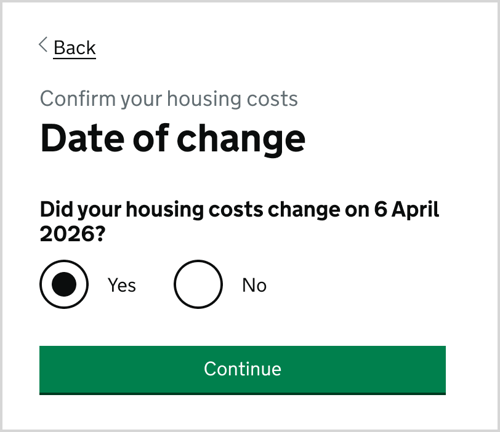
If you pay weekly, fortnightly or 4‑weekly, you will be asked:
“Did your housing costs change on 6 April 2026?”
On this screen you will see:
- A heading: Date of change
- Two options: Yes or No
- A Continue button
What to do:
- Select Yes if your housing costs changed on 6 April 2026
- Select No if they did not
- Select Continue to move on
Step 2: Confirm changes to your rent
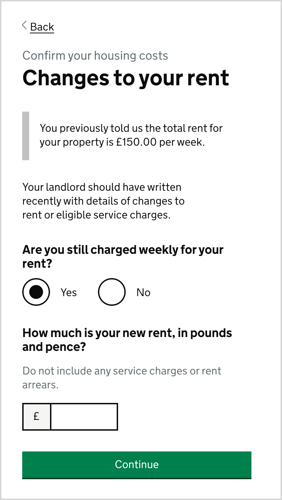
On this screen you will see:
- A heading: Changes to your rent
- Your current rent displayed on screen
- Questions asking how often you pay your rent and how much your new rent is
- A Continue button
What to do:
- Check the current rent shown on screen
- Confirm how often you pay your rent
- Enter your new rent amount, using your rent letter for reference
- Select Continue to move on
Step 3: Confirm changes to your service charges
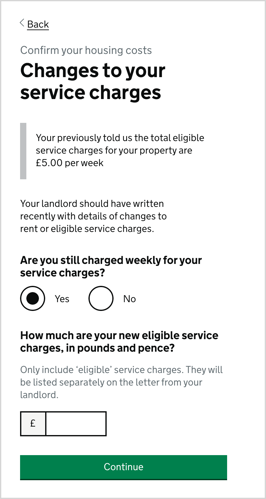
On this screen you will see:
- A heading: Changes to your service charges
- Your current service charges displayed
- Questions asking:
- How often you pay service charges
- How much your new eligible service charges are
- A message explaining that eligible service charges are listed separately on your landlord letter
- A Continue button
What to do:
- Check the current service charges shown
- Confirm how often you pay them
- Enter your new eligible service charge amount, using your landlord letter
- Select Continue to finish this section
If you still need any help or support updating your journal, please call us on 0191 525 5000 and select option 3 or speak to your Neighbourhood Coordinator.